Using the Process SLA Batches Report
Last updated: July 5, 2025
You can use the Process SLA Batches Report to batch the reporting of surplus lines policies to tax authorities.
Applies to:
- Administrators
- Managers
- Producers
- Producer Assistants
This article explains how you can use the Process SLA Batches Report to batch the reporting of surplus lines policies to tax authorities.
You can use this report to answer the following questions:
- How can a user batch policies to track reporting to surplus lines tax authorities?
- How can batches be tracked through a report in BindHQ?
- Which batches have yet to be reported to surplus lines tax authorities?
This report enables the grouping of policy transactions into batches to track reporting to tax authorities.
It can be used by Administrators, Managers, Producers, and Producer Assistants.
The batches which are generated by this report can also be tracked in the Historical Batches report within BindHQ.
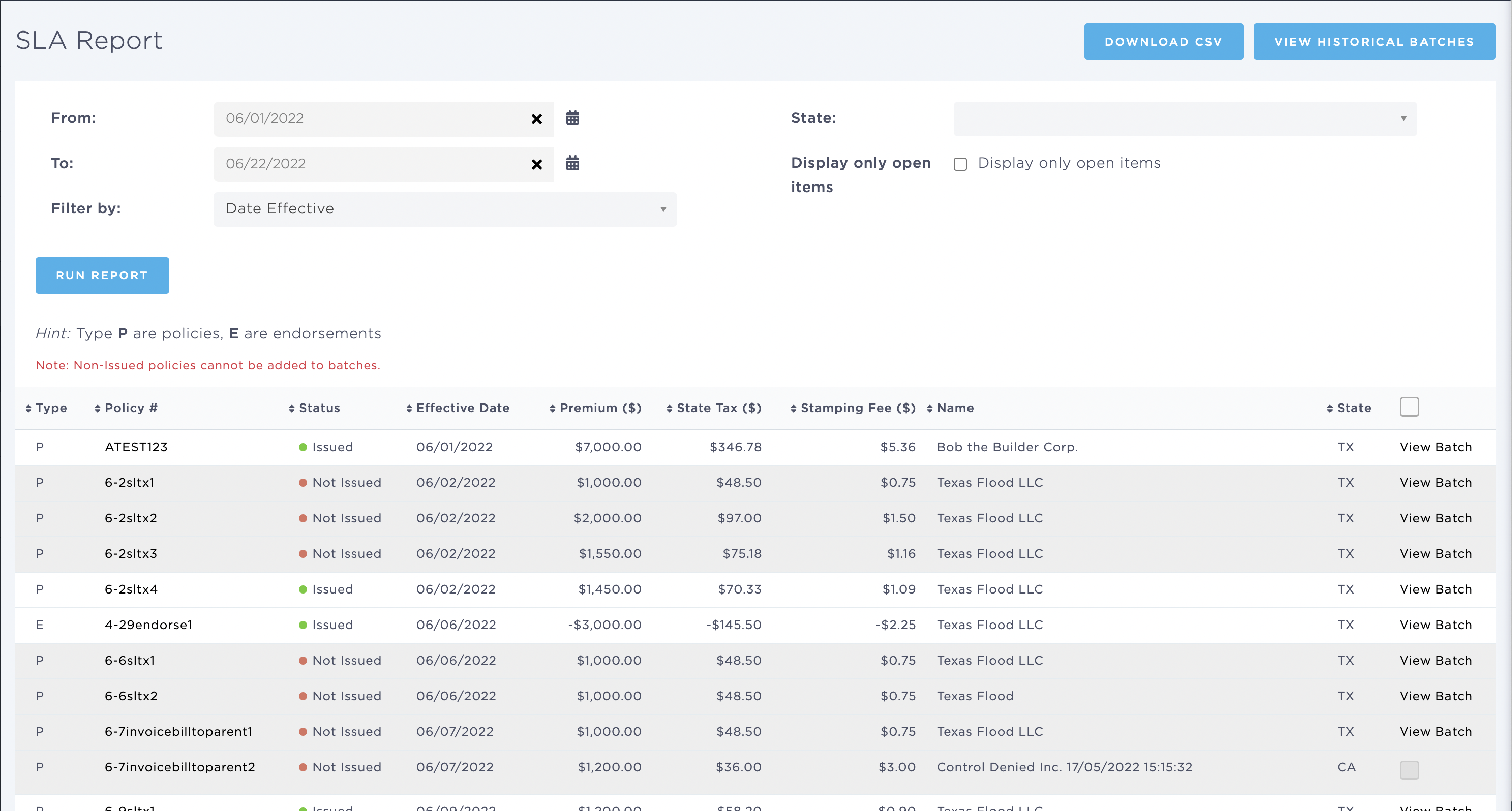
The columns included in this report are:
- Type
- Policy Number - [Policy #]
- Effective Date - [Policy Effective Date]
- Premium - [Gross Premium ($)]
- State Tax - [State Tax ($)]
- Stamp Fee - [Stamping Fee ($)]
- Name - [Insured]
- State - [State]