Using the Quick Search
Last updated: July 28, 2026
Introduction
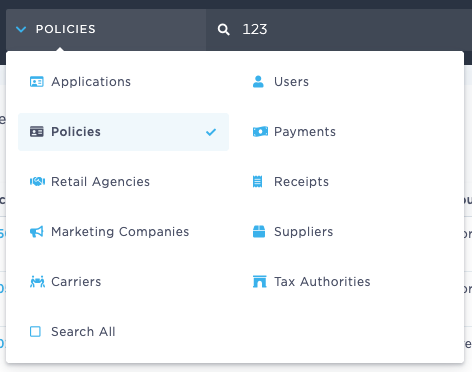
BindHQ's Quick Search allows you to search for records from any part of the system by clicking the drop down at the top of your screen and selecting a search type
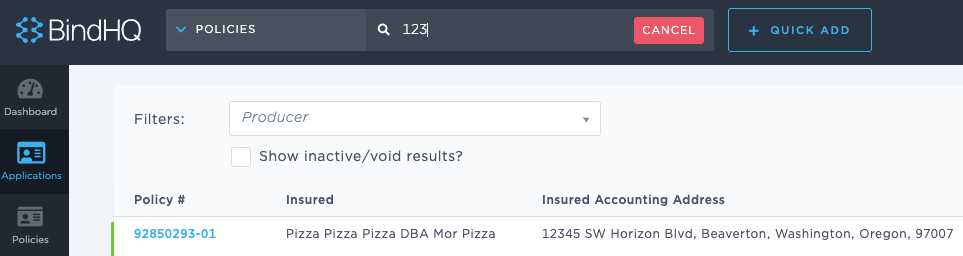
...then entering your search terms.
Please see the reference below for a list of available search types as well as the terms each type can be searched by.
Applications:
Application number/ID; insured name; insured DBA; insured address (line 1, line 2, city, ZIP); retail agency name; agency address (lines 1–3, city, ZIP)
Policies
Policy number; invoice number; insured name; insured DBA; insured address (line 1, line 2, city, ZIP); retail agency name and address; carrier name and address
Retail Agencies
Agency name; accounting address (lines 1–3, city, ZIP); phone; fax; website URL
Marketing Companies
Company name; accounting address (lines 1–3, city, state, ZIP)
Carriers
Carrier name; accounting address (lines 1–3, city, state, ZIP); phone; fax; website URL
Users
First and last name; bio; office phone; cell phone
Payments
Check number; reference; memo; customer name; customer address
Receipts
Check number; reference; memo; customer name; customer address
Suppliers
Supplier name; accounting address (lines 1–3, city, state, ZIP)
Tax Authorities
Authority name; address (lines 1–3, city, state, ZIP)
Search All
Searches all the categories above. Payments, receipts, and suppliers are included only when the Accounting feature is enabled.
Last Update: July 2026