Voiding a Bound Policy
Last updated: June 17, 2026
This article explains how to void a Policy after it's been bound
This workflow may be used to fix a policy that was bound in error, or a policy that has an invoice error that needs to be reversed.
Voiding a Bound Policy
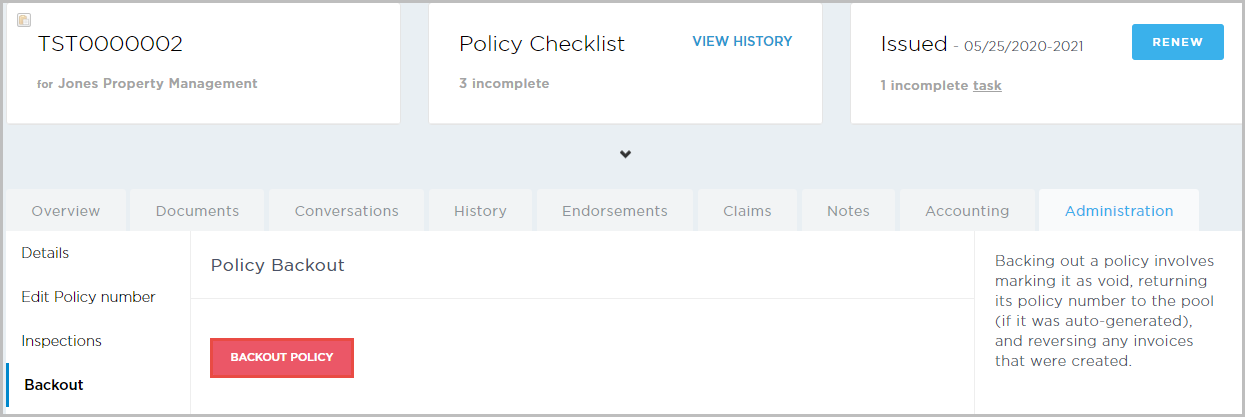
Navigate to a bound policy and select the Administration tab.
On the left, click Backout.
Click the red Backout Policy button to void the policy and reverse any associated invoices. If the policy number was part of a Policy Block, the policy number is also returned to the pool to be re-used.
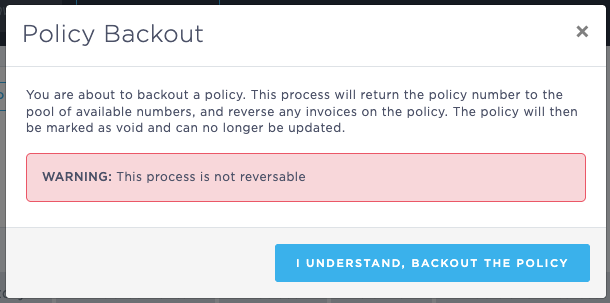
The Policy Backout confirmation pop-up opens.Click I understand, backout the policy.
At this point, the policy has been voided.
What is the impact of voiding a policy or backing out an endorsement:
Generally, when policies/endorsements are backed-out/invalidated, BindHQ tries to offset the transactions created as part of the invalidation against the original transactions. The result of this is a net zero effect, with all transactions closed.
This can only happen if the original transactions are still fully open, ie. they have not had any funds applied to them, or have not been applied to other transactions. If they have had funds applied or have been applied to other transactions, the backout transactions are created. These transactions are not offset against anything, so will remain open. It's then down to an accounting user to manually deal with these transactions however best fits that particular situation.
Voided policies will post using the same methodology as other transactions. They will post to the general ledger on the later of the effective date or transaction date.
Last Updated June 2026