Importing LOB Data via BindHQ AI Tools
Last updated: July 29, 2026
BindHQ Application Import allows you to use AI to import data from applications into the line of business in your BindHQ application.
Note: To use this feature, you'll need to have BindHQ AI features enabled.
Introduction
BindHQ's AI features allow you to ingest data from an application document and fill those data points in the line of business within BindHQ.
Using AI Data Ingestion
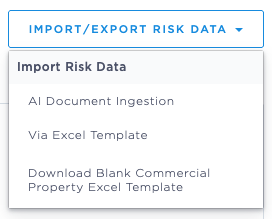
When you reach the "Line of Business Details" step, click the "Import/Export Risk Data" menu in the upper right and select "AI Document Ingestion"
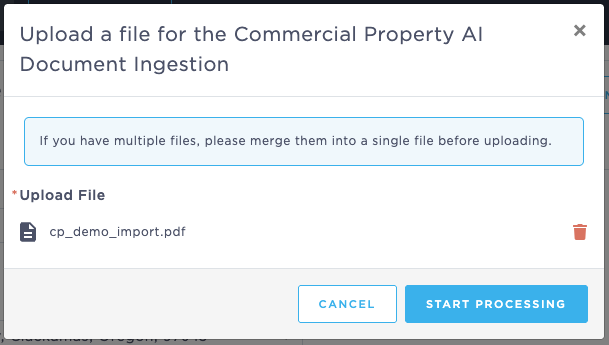
Drag and drop your application document here, or click "browse files" to locate the file. Once your file is selected, click "Start processing".
Once the document has finished processing, the system will provide you with a summary of what data was imported, as well as notes on any data with potential import issues.
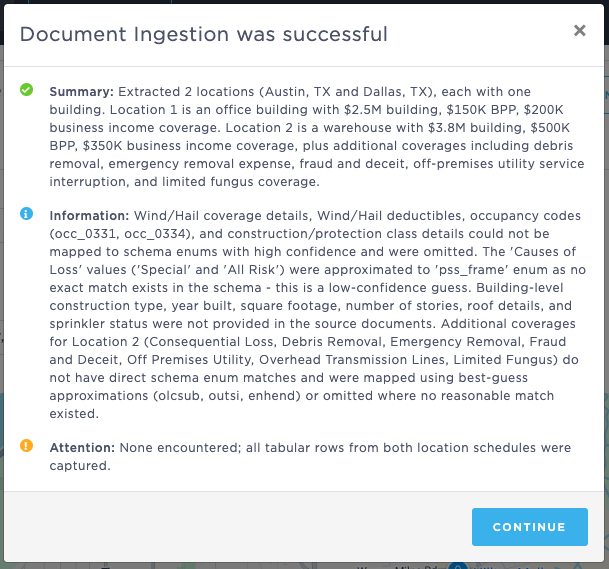
Click "Continue" to complete the process.
Review and confirm all application data before proceeding to the next step. You can also view the provided summary again at any time using the link provided.

Once you've confirmed that all data is correct, you can proceed to the next step in the application process.
Last Update: July 2026