Primary Risk Address
Last updated: July 5, 2025
Understand how the Primary Risk Address works
Applies to:
- Producers
- Assistants
- Admins
Last Updated: February 2023
This article explains how the primary Risk Address behaves
The sections for this article are:
- Overview and use cases
- Constraints and possibilities
Overview and use cases
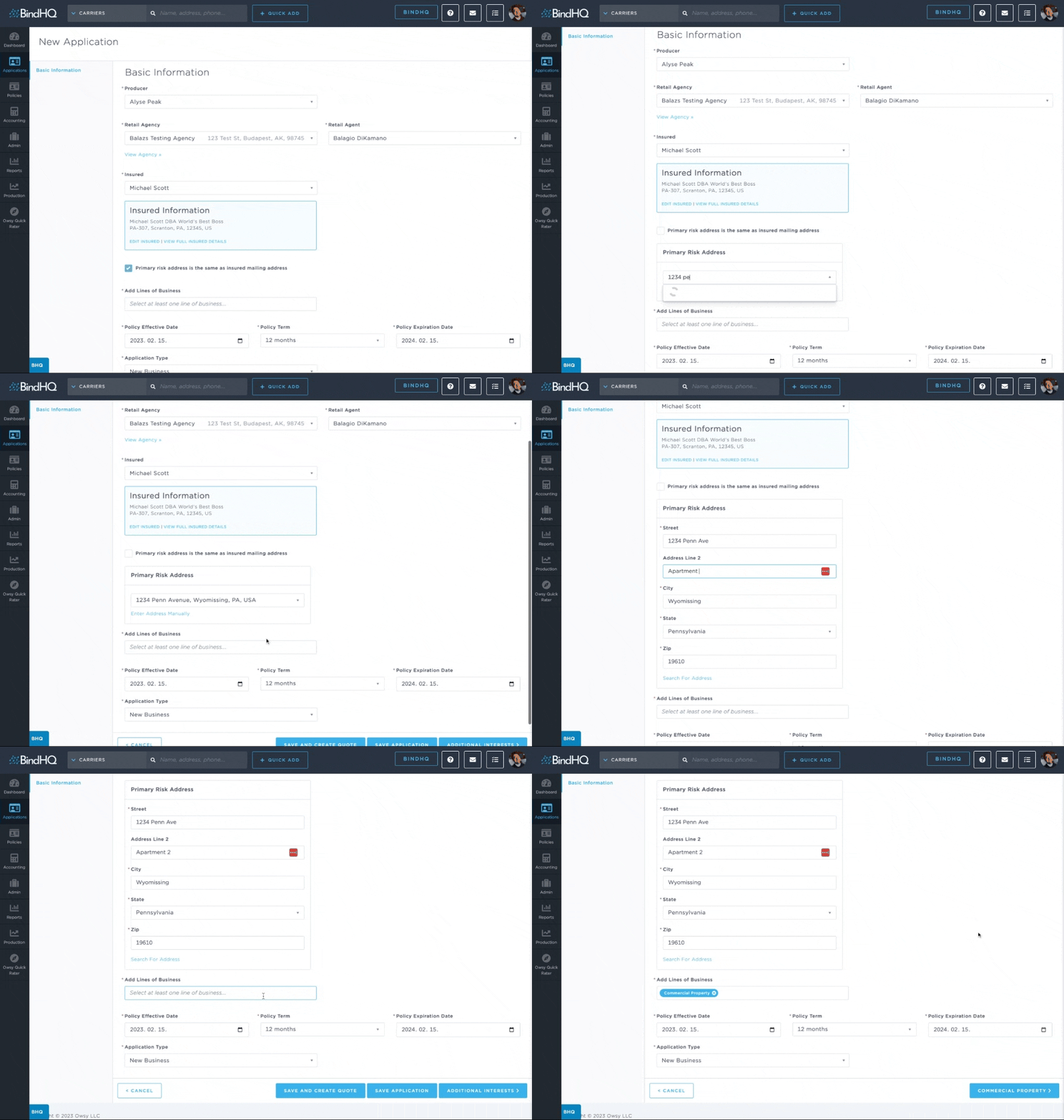
Applications, Quotes, and Policies have a Primary Risk Address. This information is then surfaced on the Application and Policy listing screens and in various reports.
The Primary Risk Address defaults to the Insured Mailing Address. This can then optionally be overwritten by either searching for an address, or if specifics are needed then the ability to manually edit is available as well.
The Primary Risk Address will be used for the address on the first location added for any fully supported BindHQ Line of Business on the risk information tab. Examples of fully supported BindHQ Line of Businesses are: Commercial Property, Homeowners, Dwelling Property, General Liability, etc.
Constraints and possibilities
The Primary Risk Address and the addresses on the LOB tabs are not connected. The system will default the first location to the primary risk location, but changing the location on any of the LOB tabs will NOT overwrite and update the Primary Risk Address. Similarly, any update on the Primary Risk Address will NOT have an effect on already saved location addresses.