Understanding Divisions in BindHQ
Last updated: April 1, 2026
Introduction
Divisions are a core component of BindHQ’s Enterprise tier architecture. They enable organizations to manage multiple financial and operational entities within a single BindHQ installation while maintaining clear data separation.
Divisions allow organizations to:
Operate multiple financial entities within one system
Segment financial and operational data by entity
Consolidate reporting across divisions for enterprise-level visibility
This structure is particularly valuable for organizations operating across multiple states, brands, underwriting companies, or entities.
What Is a Division?
A Division represents a distinct business unit or financial entity within your organization.
Divisions are commonly used by:
Multi-state MGAs
Organizations managing multiple underwriting companies
Enterprises operating under multiple legal entities or brands
Within BindHQ, divisions allow you to separate:
Premiums
Payables and receivables
Reporting
Operational data
Enterprise customers can view data at the individual division level or roll up financial performance across multiple divisions for consolidated reporting.
Division-Specific and Organization-Level Entities
BindHQ separates entities into three categories: division-specific, multi-division, and organization-level.
Division-Specific Entities:
These entities are created and managed within a single division and cannot span across divisions:
Accounting Entities (excluding accounting periods)
Agency
Agent
Application
Automation
Carrier
Checklist
Contract
File
Finance Company
Inspection Company
Installment Plan
Insured
Marketing Company
Office
Custom LOB
Program/Quote Template
Admitted Company
Task
Team
Template
Each of these entities is created, transacted, and reported on within its assigned division.
Entities That Can Belong to Multiple Divisions
Users
Suppliers
Organization-Level Entities:
These entities are configured at the organization level and are shared across all divisions:
Suppliers
Tax Authority configuration
Class Codes
Subjectivities
Policy Checklists
Organization-level entities help maintain consistency and reduce duplication across divisions.
Managing User Access to Divisions
Enterprise administrators can control which divisions a user can access through User Admin Settings.
To assign a user to one or more divisions:
Navigate to Settings > Company Settings > Users
Select the user’s profile
In the Division Access section, select one or multiple divisions
Save changes
Users assigned to multiple divisions can view, transact, and report across those divisions, subject to their role-based permissions.
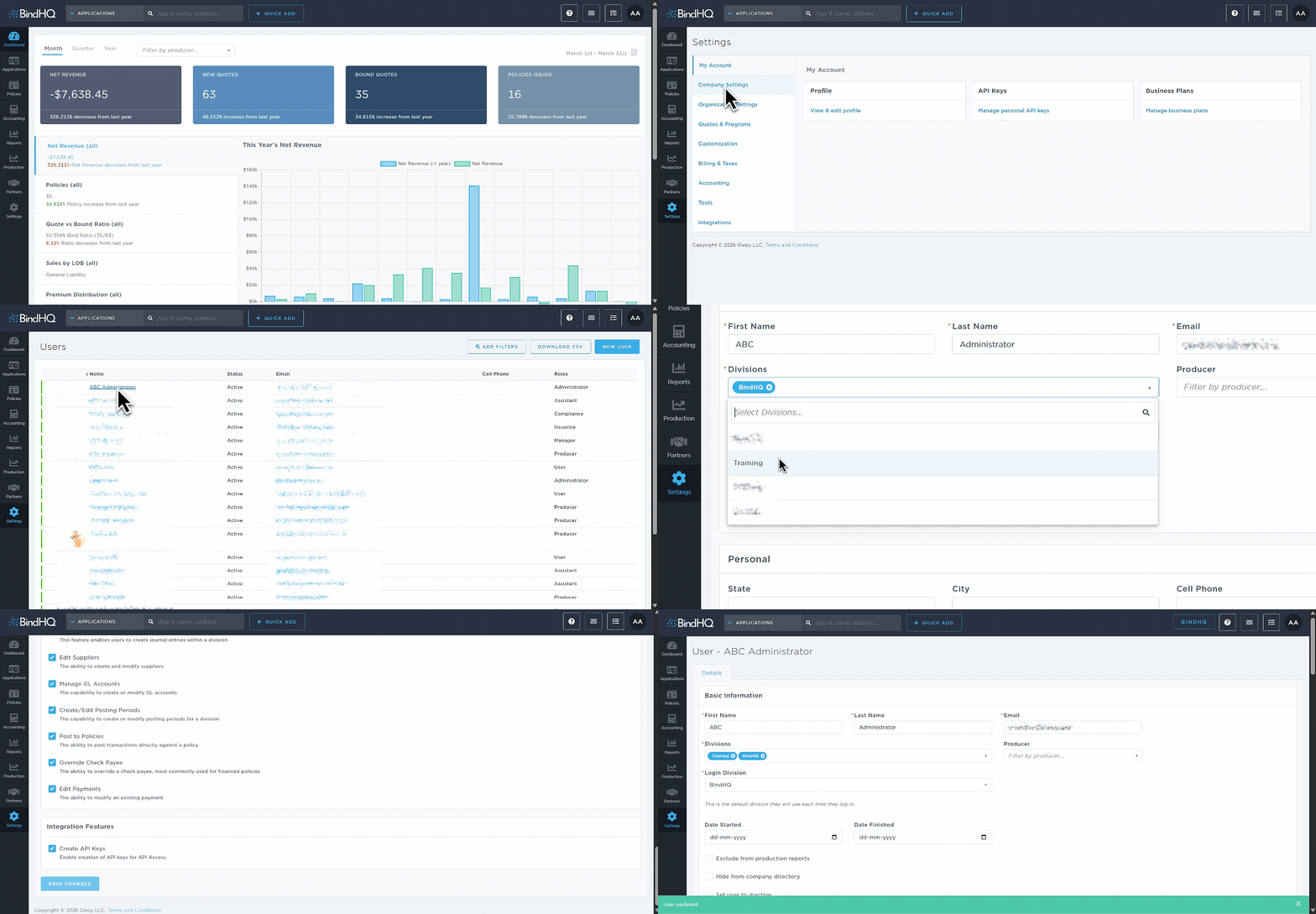
Note: A user’s default division (the division they access upon logging into BindHQ) will always be listed first.
Example Use Case
Scenario: A national MGA operates separate entities in Texas and California.
Using Divisions in BindHQ, they can:
Track separate profit and loss statements for each state
Assign region-specific agencies and insureds
Consolidate reports to view the total premium written across both divisions
Last Update: March 2026