Using the AP Aging Summary Report
Last updated: July 5, 2025
You can use the AP Aging Summary Report to view a list of unpaid bills and unused bill credits by aged period.
Applies to: Accountants, Accounting Assistants
This article explains how to use the AP Aging Summary Report to generate a list of unpaid bills and unused bill credits by aged period.
You can find this report by going to the “Accounting” tab in the side navbar, then going to “Reports”, and then selecting “AP Aging Summary Report” from the Payables tab
You can use this report to answer the following questions:
- How can I generate a list of unpaid bills by aged period?
- How can I generate a list of unused bill credits by aged period?
The report can be filtered for each division of your agency, by due date or by transaction date, by “As at date”, and by type of account.
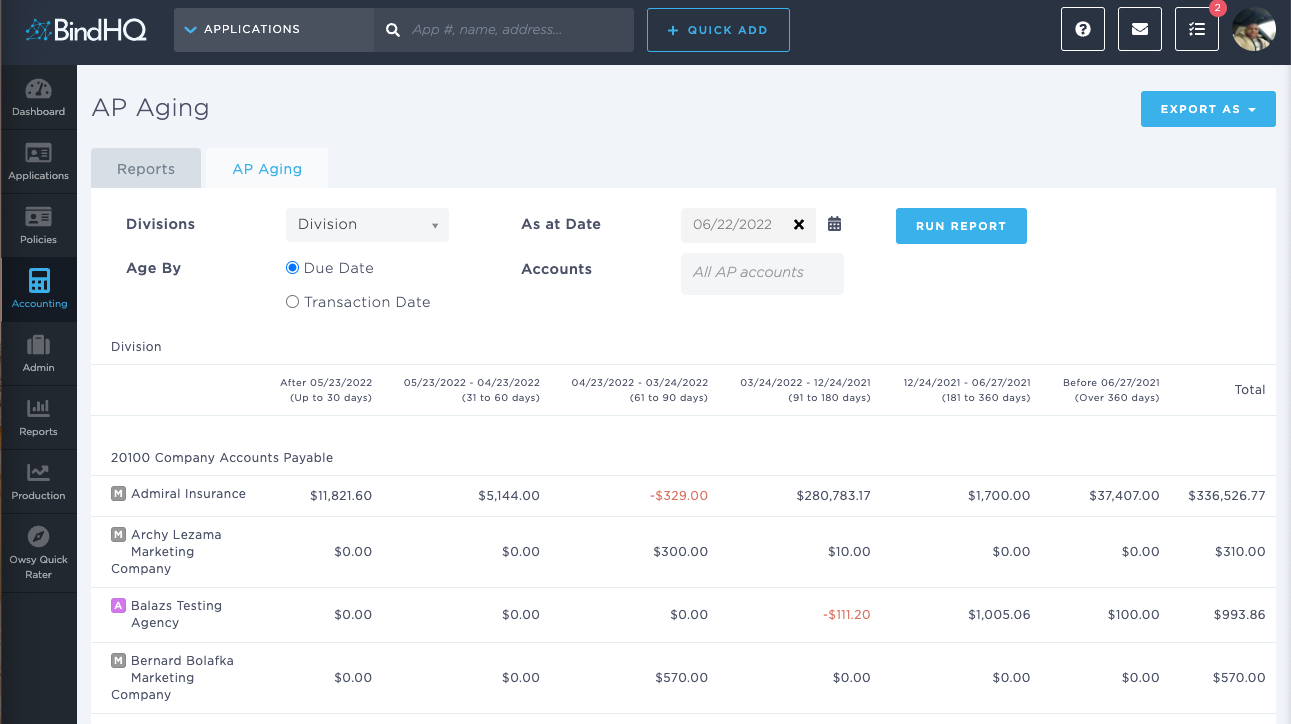
To generate the AP Aging Summary Report, you must click ‘Run Report’. Depending on the size of the accounting data, this may take some minutes to generate.
The On-Screen Report categorizes outstanding payables by payable type. Depending on the way in which your agency has set up its Chart of Accounts, this might include:
- Premium Payables
- Agency Direct Bill Payables
- Operating Payables
- Taxes Payable
Within each category, the AP Aging Summary Report will list all the entities to which monies are owed by your agency.
The payable amounts (i.e. net premium payments to Marketing Companies, taxes to tax authorities or monies owed to suppliers etc ) to each entity are listed and are subdivided into the following time buckets:
- Up to 30 days
- 31 - 60 days
- 61 - 90 days
- 91 - 180 days
- 181 - 360 days
- Over 360 days
- Total
If there are any payables that are in credit, they are listed in red on screen. The total amount in the right hand column nets out these amounts.
You can export the AP Aging Summary Report as a CSV by clicking on the ‘Export As’ button in one of three formats:
- Summary CSV
- Detail CSV
- Dump CSV