Using the AP Aging Detail Report
Last updated: July 5, 2025
You can use the AP Aging Detail Report to look at transaction-level detail for AP Aging.
Applies to: Accountants, Accounting Assistants
This article explains how to use the AP Aging Detail Report to review transaction-level details for AP Aging.
You can find this report by going to the “Accounting” tab in the side navbar, then going to “Reports”, and then selecting “AP Aging Detail Report” from the Payables tab.
You can use this report to answer the following questions:
- How can I look at transaction level details for AP Aging?
You must enter the Division (if relevant), Customer name, and you have the option to select a specific Account. You can also decide to run the report by either the [Invoice] Due Date or Transaction Date.
To generate the report, click on the ‘Run Report’ button.
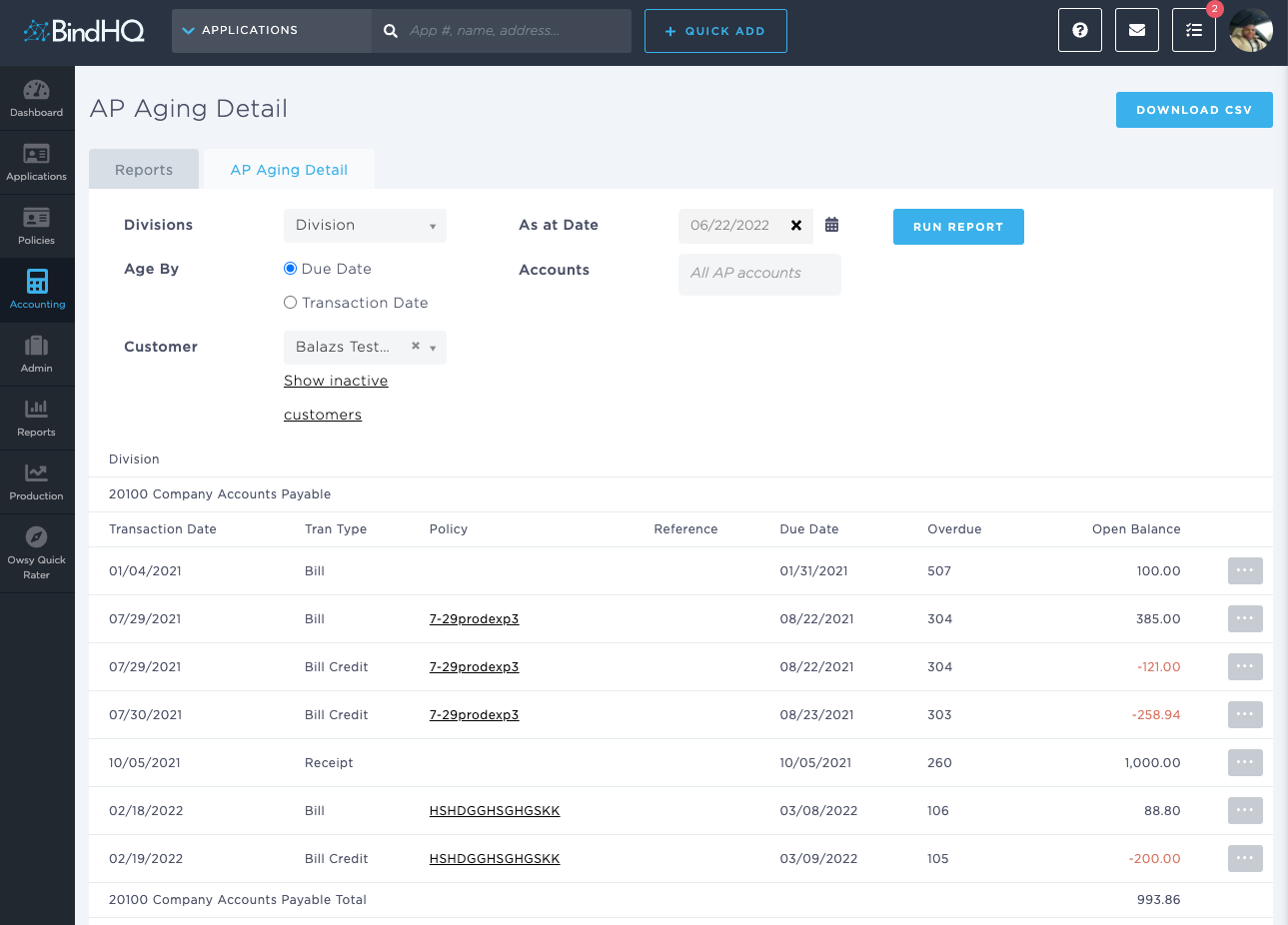
The On-Screen AP Aging Detail Report displays the following columns: Transaction Date, Transaction Type, Policy #, Reference, Due Date, Days Overdue, and Open Balance.
- The Policy column hyperlinks to the Policy page which provides detailed information
You can access the Bill Detail page for the payable by clicking the grey button the right hand side of the UI.