Using the AR Aging Summary Report
Last updated: July 5, 2025
You can use the AR Aging Summary Report to quickly generate a list of unpaid invoices and unused credits by aged period.
Applies to: Accountants, Accounting Assistants
This article explains how to generate a list of unpaid invoices and unused credits by aged period.
You can find this report by going to the “Accounting” tab in the side navbar, then going to “Reports”, and then selecting “AR Aging Summary Report” from the Receivables tab.
You can use this report to answer the following questions:
- What receivable amounts (i.e. unpaid invoices and unused credits) in each account does my agency have in these time buckets:
- Up to 30 days
- 31 - 60 days
- 61 - 90 days
- 91 - 180 days
- 181 - 360 days
- Over 360 days
- Total
Once you have clicked ‘Run Report’, the following on-screen report is displayed:
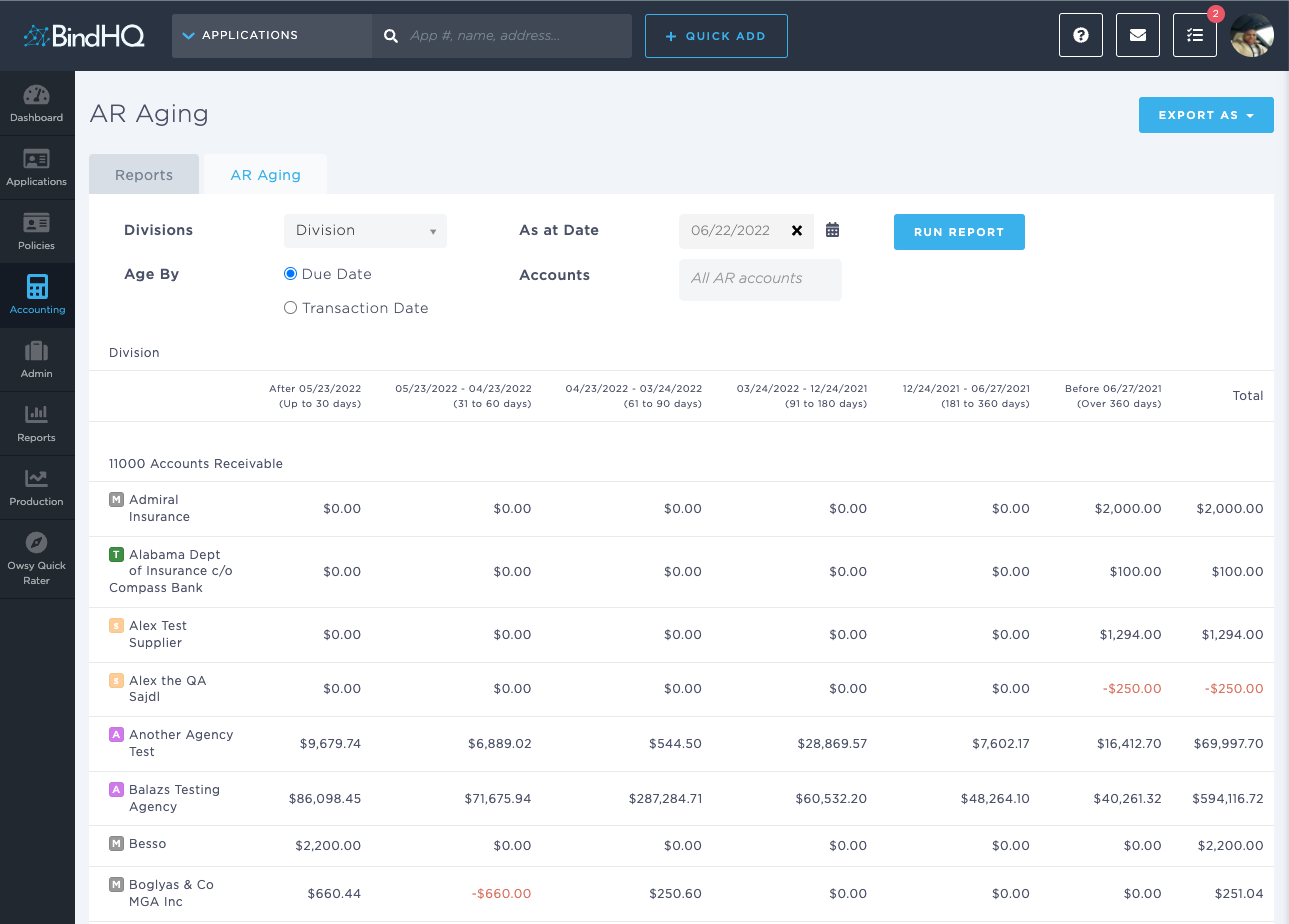
The On Screen report lists every entity with an Account Receivable account in your Chart of Accounts.
You can download the AR Aging Summary Report in 3 formats:
- Summary CSV
- Detail CSV
- Dump CSV